Inkplate 5v2 MicroPython - Read and write
You can use the onboard microSD card to read and write data files. This example creates a text file, writes to it, then reads the contents back.
Writing and reading a file
Before running this example, make sure your SD card is formatted as FAT16, FAT32 or exFAT and inserted into Inkplate 5v2. To learn how to format the microSD card, see preparing the microSD card before usage.
from inkplate5v2 import Inkplate
import os

inkplate=Inkplate(Inkplate.INKPLATE_1BIT)
inkplate.begin()
inkplate.init_sd_card()

#List files on the SD card
print("Files on SD:", os.listdir("sd"))

#Writing to a file
with open("sd/example.txt", "w") as f:
    f.write("Hello from Inkplate!\n")
    f.write("this text is stored on the SD card.\n")
print("Data written to sd/example.txt")

#Reading from the same file
with open("sd/example.txt","r") as f:
    content=f.read()
print("File contents:")
print(content)
open()
Open a file from the microSD card for reading or writing.
Returns type: File object
Returns value: File object that can be read from or written to.
Function parameters:
| Type | Name | Description |
|---|---|---|
String | path | Path to the file on the card, for example sd/example.txt or /sd/example.txt. |
String | mode | Defines what action will happen to specified file. |
ℹ️
All available mode options:
| Mode | Meaning |
|---|---|
"r" | Read (default). Opens a file for reading. Errors if the file does not exist. |
"a" | Append. Opens a file for appending. Creates the file if it does not exist. |
"w" | Write. Opens a file for writing. Creates the file if it does not exist (overwrites if it does). |
"x" | Create. Creates a new file. Errors if the file already exists. |
"t" | Text mode (default). Reads/writes strings. |
"b" | Binary mode. Reads/writes raw bytes (for example images or data files). |
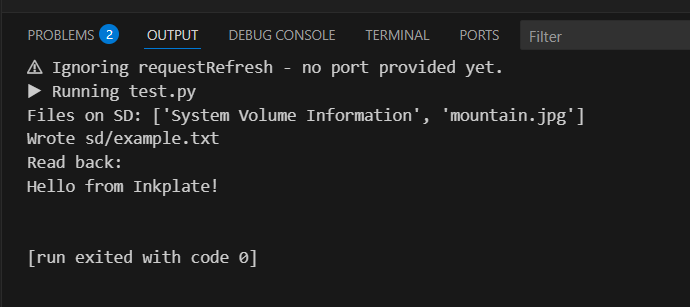
Example output
Full example
microsd_read_write.py
List, write and read back a text file on the microSD card.