Inkplate 6COLOR – Drawing colorful shapes
Colorful shapes example
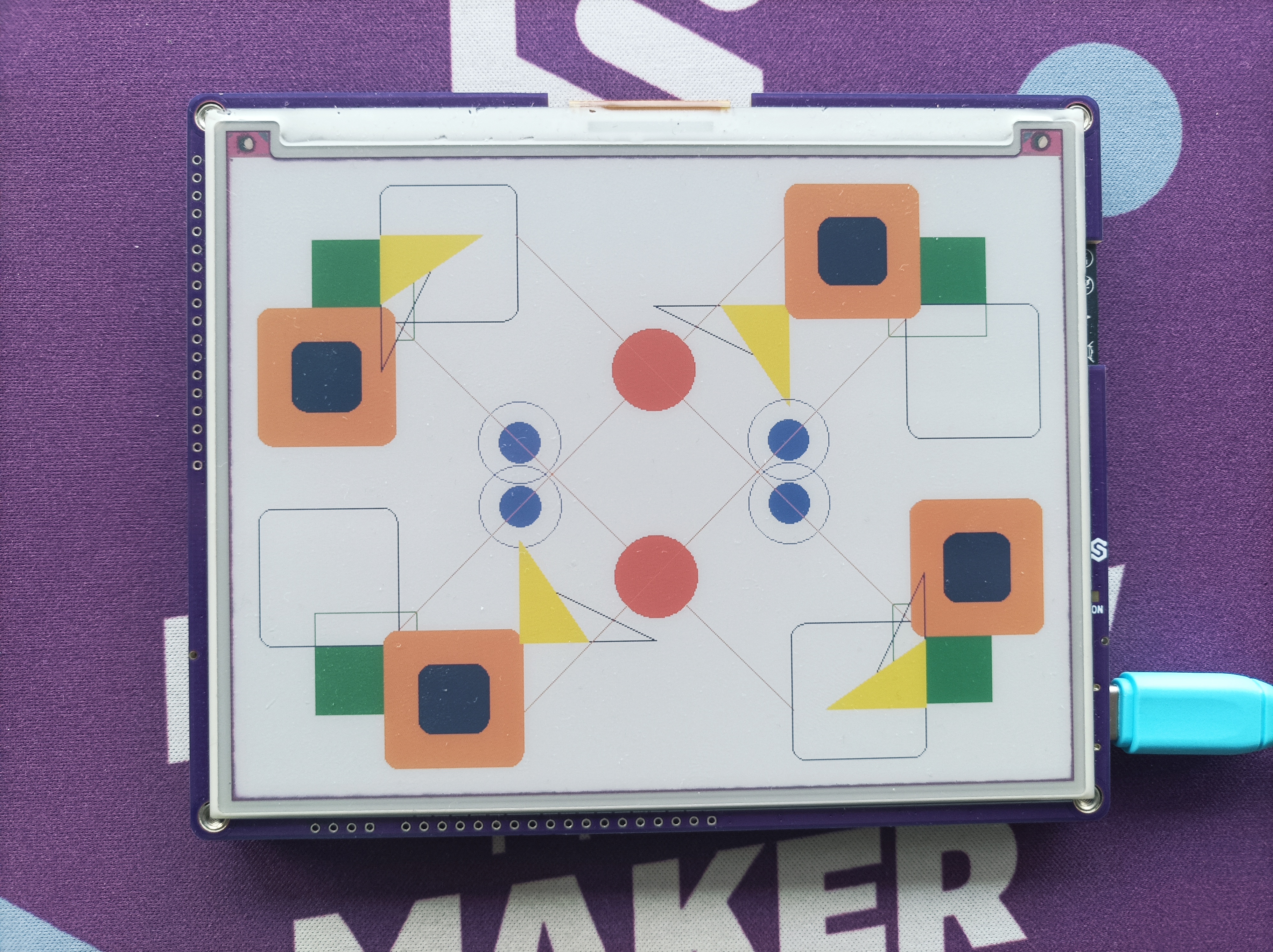
# Include all the required libraries
from inkplate6_color import Inkplate

# Create Inkplate object
inkplate = Inkplate()


# Initialize the display, needs to be called only once
inkplate.begin()

# Let's draw some shapes!
# This example will draw shapes around the upper left corner, and then rotate the screen
# This creates a symmetrical-looking pattern of various shapes
for r in range(4):
    # Sets the screen rotation
    inkplate.set_rotation(r)

    # All drawing functions
    # Available colors are:
    # Black, white, green, blue, red, yellow, orange
    inkplate.draw_pixel(100, 100, inkplate.BLACK)
    inkplate.draw_rect(50, 50, 75, 75, inkplate.GREEN)
    inkplate.draw_circle(200, 200, 30, inkplate.BLUE)
    inkplate.fill_circle(300, 300, 30, inkplate.RED)
    inkplate.draw_fast_hline(20, 100, 50, inkplate.BLACK)
    inkplate.draw_fast_vline(100, 20, 50, inkplate.ORANGE)
    inkplate.draw_line(100, 100, 400, 400, inkplate.ORANGE)
    inkplate.draw_round_rect(100, 10, 100, 100, 10, inkplate.BLACK)
    inkplate.fill_round_rect(10, 100, 100, 100, 10, inkplate.YELLOW)
    inkplate.draw_triangle(300, 100, 400, 150, 400, 100, inkplate.BLACK)

# Reset the rotation
inkplate.set_rotation(0)

# Show on the display
inkplate.display()
inkplate.set_rotation()
Sets the rotation of the screen, adjusting the (x, y) coordinate origin point
Returns type: none
Function parameters:
| Type | Name | Description |
|---|---|---|
int | x | Value from 0 to 3 (1 rotates by 90 degrees, 2 by 180 degrees, 3 by 270 degrees, 0 is default rotation) |
inkplate.draw_pixel()
Sets pixel data on given (x, y) position
Returns type: none
Function parameters:
| Type | Name | Description |
|---|---|---|
int | x | X coordinate |
int | y | Y coordinate |
int | c | Pixel color |
inkplate.draw_rect()
Function to draw a rectangle
Returns type: none
Function parameters:
| Type | Name | Description |
|---|---|---|
int | x | X coordinate |
int | y | Y coordinate |
int | width | Rectangle width |
int | height | Rectangle height |
int | c | Rectangle color |
inkplate.draw_circle()
Function to draw a circle
Returns type: none
Function parameters:
| Type | Name | Description |
|---|---|---|
int | x | X coordinate |
int | y | Y coordinate |
int | r | Circle radius |
int | c | Circle color |
inkplate.fill_circle()
Function to draw a filled circle with specified color
Returns type: none
Function parameters:
| Type | Name | Description |
|---|---|---|
int | x | X coordinate |
int | y | Y coordinate |
int | r | Circle radius |
int | c | Circle fill color |
inkplate.draw_fast_hline()
Function to draw a horizontal line
Returns type: none
Function parameters:
| Type | Name | Description |
|---|---|---|
int | x | X start coordinate |
int | y | Y start coordinate |
int | width | Line width to set how many pixels to draw |
int | c | Line color |
inkplate.draw_fast_vline()
Function to draw a vertical line
Returns type: none
Function parameters:
| Type | Name | Description |
|---|---|---|
int | x | X start coordinate |
int | y | Y start coordinate |
int | height | Line height to set how many pixels to draw |
int | c | Line color |
inkplate.draw_line()
Function to draw a line from start to end
Returns type: none
Function parameters:
| Type | Name | Description |
|---|---|---|
int | x0 | X coordinate for first point |
int | y0 | Y coordinate for first point |
int | x1 | X coordinate for second point |
int | y1 | Y coordinate for second point |
int | c | Line color |
inkplate.draw_round_rect()
Function to draw a rectangle with rounded edges
Returns type: none
Function parameters:
| Type | Name | Description |
|---|---|---|
int | x | X coordinate |
int | y | Y coordinate |
int | width | Rectangle width |
int | height | Rectangle height |
int | radius | Border radius |
int | c | Rectangle color |
inkplate.fill_round_rect()
Function to draw a rounded rectangled filled with specified color
Returns type: none
Function parameters:
| Type | Name | Description |
|---|---|---|
int | x | X coordinate |
int | y | Y coordinate |
int | width | Rectangle width |
int | height | Rectangle height |
int | radius | Border radius |
int | c | Rectangle color |
inkplate.draw_triangle()
Function to draw a triangle
Returns type: none
Function parameters:
| Type | Name | Description |
|---|---|---|
int | x0 | X coordinate for first point |
int | y0 | Y coordinate for first point |
int | x1 | X coordinate for second point |
int | y1 | Y coordinate for second point |
int | x2 | X coordinate for third point |
int | y2 | Y coordinate for third point |
int | c | Triangle color |
inkplate.fill_triangle()
Function to draw a triangle filled with specified color
Returns type: none
Function parameters:
| Type | Name | Description |
|---|---|---|
int | x0 | X coordinate for first point |
int | y0 | Y coordinate for first point |
int | x1 | X coordinate for second point |
int | y1 | Y coordinate for second point |
int | x2 | X coordinate for third point |
int | y2 | Y coordinate for third point |
int | c | Triangle fill color |
Full examples
basic_color.py
Example showing how to draw shapes around the upper left corner and then rotate the screen.
draw_color_image.py
Draw a small pre-packed color image buffer directly onto the screen.